
Post Mobile Notary Services: Fees, Documents, Coverage
Mobile notaries can get better first messages by listing service area, fees, document types, client requirements, and appointment rules before clients ask.
ARTICLE LANGUAGE
Showing original language
A mobile notary, loan-signing agent, or paperwork helper can turn one clear service listing into a better first conversation with local clients. If you already know the ZIP codes you cover, the documents you handle, and your travel fee, start with a prefilled Brixaz service post for notary and paperwork services instead of waiting for people to ask the same basic questions one by one.
This guide is for a real provider who can accept appointments this week: a commissioned notary, mobile signing agent, immigration form preparer where allowed, apostille runner, DMV paperwork helper, or bilingual document assistant. Brixaz is still in founding-seller mode, which means the audience is smaller today, but the category is not crowded, posting is free, and interested clients can contact you directly without Brixaz taking a fee from the job.
Lead With The Appointment You Can Actually Handle
The strongest mobile notary listing does not begin with a long personal story. It begins with the appointment a client is trying to solve. Someone searching for a notary usually has a deadline, a document type, a location constraint, or all three. Your listing should make those answers visible before the client messages you.
Use a title that combines the service, coverage, and scheduling promise. A weak title is “Notary available.” A stronger title is “Mobile notary for affidavits, power of attorney, and evening appointments in northwest Chicago.” Another strong version is “Spanish-English paperwork and notary appointments near Garland, evenings and weekends.” Those titles help Brixaz understand the category, help clients scan the listing, and reduce messages from people outside your service area.
Do not promise every document under the sun. If you handle acknowledgments, jurats, affidavits, school forms, vehicle title signatures, real estate signing packages, hospital visits, or jail visits, list them plainly. If you do not handle a type of appointment, say that too. A smaller but accurate offer usually converts better than a broad claim that creates follow-up questions.
A useful first paragraph can be simple: “I provide mobile notary appointments in North Austin and nearby suburbs. I can travel to homes, offices, hospitals, and coffee shops for affidavits, powers of attorney, title documents, and general notarizations. Please have unsigned documents, valid photo ID, and all signers present.” That copy sets expectations without sounding inflated.
Show Rates Without Creating Fee Confusion
Notary fees can be regulated by state, while travel, waiting time, printing, scanning, courier, and after-hours charges may be separate. Your listing should avoid legal overreach and avoid surprising the client. Instead of writing “cheap notary,” explain the pieces of the price so the client knows what to ask.
A clean pricing block might say: “State notary fee charged according to local rules. Mobile travel fee starts at $25 within my regular coverage area. Extra charges may apply for late-night appointments, long distance travel, printing large loan packages, or waiting more than 15 minutes.” Do not invent a state rule in your listing. If your state limits certain notary charges, follow that rule and keep the post factual.
For Brixaz, price clarity matters because direct contact works best when the client can send a complete first message. A parent at a school, a family arranging a medical document, or a buyer signing a vehicle title may not know what “mobile notary” includes. When your listing separates the notarization fee from the travel fee, the message can start with “Can you come to this ZIP code at 6 p.m. for two signatures?” instead of “How much?”
| Listing field | What to include | Why it helps |
|---|---|---|
| Base service | Mobile notary, loan signing, paperwork help, apostille courier, or document prep support | Clients know whether you fit their document need |
| Coverage area | City, neighborhoods, ZIP codes, radius, and whether hospitals or offices are included | Reduces messages from locations you cannot reach |
| Fees | State notary fee, travel minimum, after-hours fee, printing or scanning fee | Prevents surprise pricing and vague “how much” threads |
| Availability | Same-day, evenings, weekends, appointment windows, response cutoff | Urgent clients can decide whether to message now |
| Client requirements | Unsigned document, valid ID, all signers present, witness rules if applicable | Avoids wasted trips and incomplete appointments |
List Documents, Boundaries, And Client Requirements

Your document list should be specific enough to attract the right client, but careful enough not to imply that you provide legal advice unless you are licensed to do so. You can write “I notarize signatures on completed documents” without saying you draft or explain legal forms. You can write “I can print a document package sent by email” without promising that the document itself is valid.
For many mobile notary appointments, the most important requirements are operational: the signer must be present, the signer must have acceptable ID, the document should not be signed before the appointment, the signer must be willing and aware, and witnesses may need to be arranged separately. If your state or service type has additional rules, mention them in plain language and tell clients to confirm before booking.
Bad copy: “I do all legal documents fast. Message me.” Better copy: “I can travel for affidavits, school forms, vehicle title signatures, and general notarizations. I do not give legal advice or choose forms for you. Please confirm the document type, number of signers, appointment address or ZIP code, and whether witnesses are already arranged.”
This kind of boundary does not scare serious clients away. It signals that you know the work and respect the limits of the role. On Brixaz, where clients contact providers directly, boundaries also make the first message more complete and reduce awkward conversations after arrival.
Use Photos That Build Trust Without Exposing Private Information
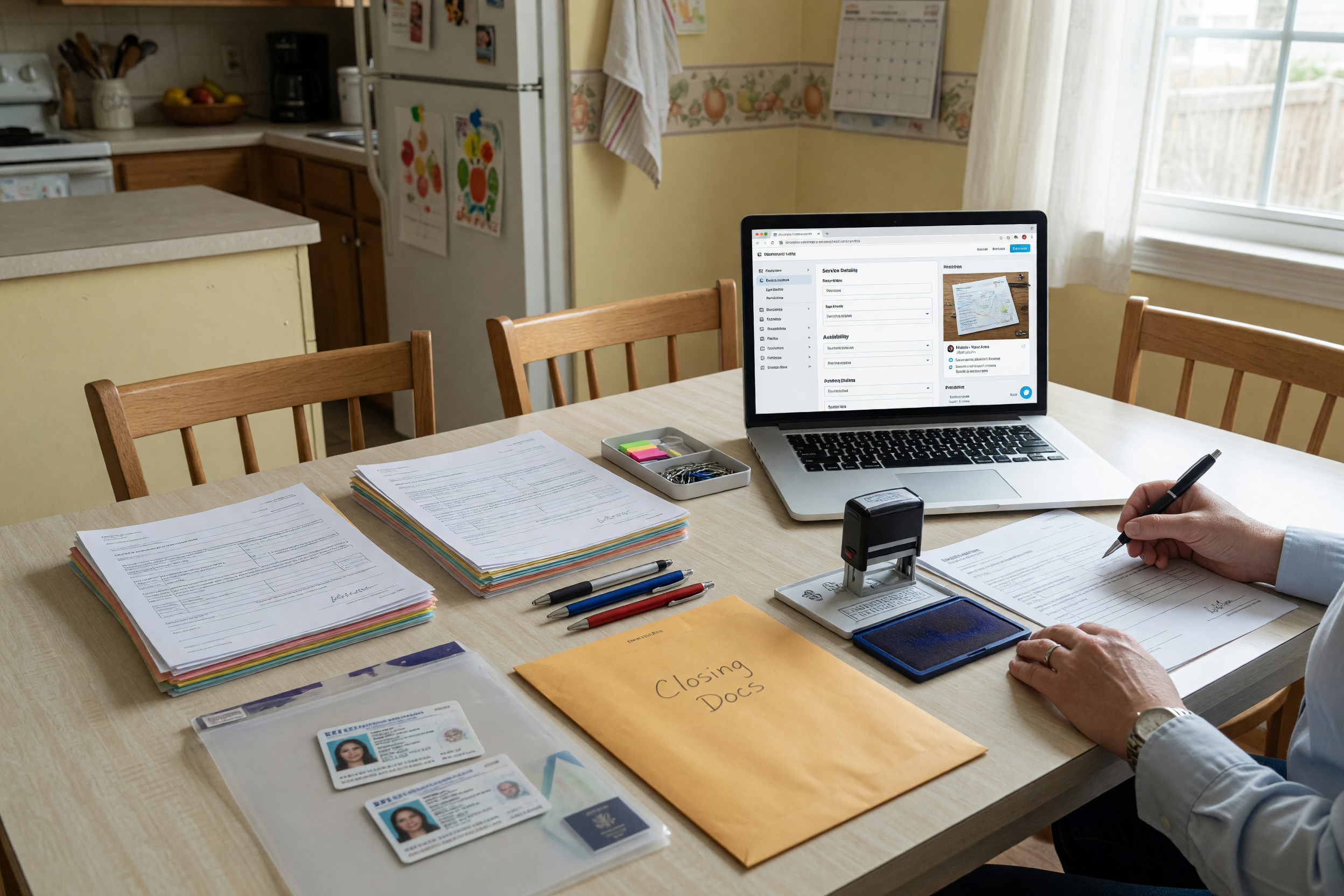
A notary or paperwork service does not need dramatic photos. It needs trust signals. Use a clean photo of your organized work setup: pens, stamp case, blank clipboard, appointment bag, printer, scanner, or car trunk setup if you travel. Do not show readable names, document numbers, signatures, IDs, license numbers, certificates with full details, addresses, or client faces.
If you use a profile photo elsewhere, keep the Brixaz listing focused on the service itself unless you are comfortable being shown publicly. A good photo set can include your appointment kit, a neutral table setup, your portable printer, and a clean image of your general service area map without a home address. If you are bilingual, you can state that in the description instead of adding text-heavy graphics.
The photo caption or description should support the client’s next step. For example: “Mobile appointments available at homes, offices, hospitals, and public meeting spots by appointment.” That line tells a client how the service works without creating privacy risk.
Avoid stock-looking images of handshakes, courthouse steps, or generic legal symbols. They do not help a client know whether you can come to their location tonight, handle two signers, print a loan package, or meet at a hospital desk. Practical photos win because practical questions drive the booking.
Write The First Message For The Client
A listing should quietly teach clients how to contact you. When you tell people exactly what to include, you get fewer incomplete messages and fewer back-and-forth delays. This is especially important for mobile notary work because the appointment can fail if the address, signer count, ID status, or witness need is unclear.
Add a short “message me with” line near the end of the description. Use something like: “Please send your city or ZIP code, document type, number of signers, preferred appointment time, whether you need printing, and whether witnesses are required.” That single sentence can save several messages.
You can also include a short reply script for yourself. When someone messages, answer with: “Thanks. I can check availability for that time. Please confirm the appointment ZIP code, the number of signers, whether everyone has current photo ID, and whether the document is already complete but unsigned.” This keeps the conversation professional without sounding cold.
If you serve Spanish-speaking clients, mention that clearly in English because the source blog post is English and the Spanish version will be generated later. A listing line like “Spanish and English appointments available” covers bilingual search intent while staying useful to both audiences.
Choose The Right Brixaz Surface And Keep The Listing Focused
For a mobile notary, the right Brixaz route is a service listing, not a job post and not a general classified. Use the service category for notary and paperwork so clients browsing local services can find you in the right context. If you already have a finished ad on another platform, the shorter next step may be to bring that copy into Brixaz through the import flow and then tighten the fees and service area.
If you are still deciding how to phrase the offer, use the marketplace listing template generator to organize the description before you post. Keep the final listing narrow: one service area, one service category, one clear fee structure, and one set of booking requirements. You can always create a second listing later if you also offer tax preparation, courier work, translation, or remote admin support.
That focus is a Brixaz-specific advantage for founding sellers. A smaller marketplace cannot promise you a guaranteed view count or sale. What it can give you today is cleaner category placement, free posting, direct client contact, and lower early competition in service categories that are still thin. A specific notary listing has a better chance of being useful than a broad “I do paperwork” post that no one can evaluate.
For providers who also handle broader document support, use this companion checklist: paperwork help services with scope and ID rules
FAQ
What should I put in a mobile notary service listing?
Include your city or coverage area, appointment hours, document types, number of signers you can handle, travel fee, state notary fee language, printing or scanning fees, and what clients must have ready before you arrive.
Can I list loan signing services on Brixaz?
Yes, if you actually offer that service and describe it accurately. State whether you handle loan packages, whether printing is included, how you price travel and printing, and what appointment windows you accept. Do not imply certification or legal authority you do not have.
Should I publish my exact address?
No. Use a city, ZIP code range, neighborhood list, or travel radius. For mobile work, clients need to know where you travel, not where you live. Share exact meeting details only after you have confirmed the appointment.
How do I avoid price disputes?
Break the price into parts: regulated notary fee if applicable, travel minimum, after-hours fee, printing fee, waiting fee, and any distance limits. Ask the client to confirm document type, signer count, and location before you quote the final appointment total.
Can I write that I help with legal documents?
You can describe document types you notarize or paperwork tasks you perform, but avoid saying you provide legal advice unless you are licensed and allowed to do so. A safer line is: “I notarize signatures on completed documents and do not choose forms or give legal advice.”
What if I speak Spanish and English?
Say it plainly in the listing, such as “Spanish and English appointments available.” That helps bilingual families, businesses, and sellers understand that they can contact you directly in the language they prefer.




Comments
Loading comments...
Checking sign-in status...